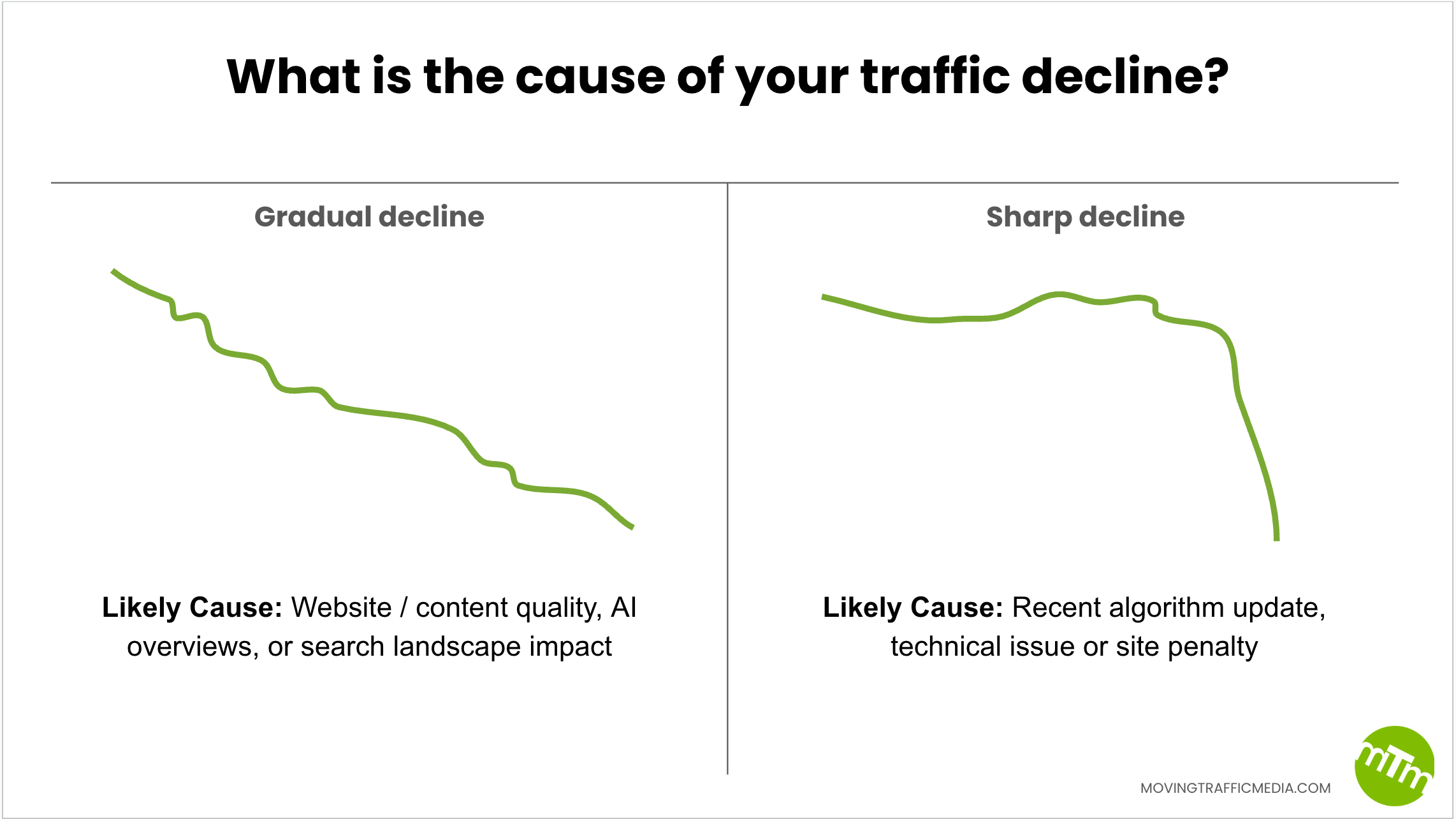
Work through it top to bottom. The tables marked “Your turn” are meant to be filled in.
How the pieces fit together
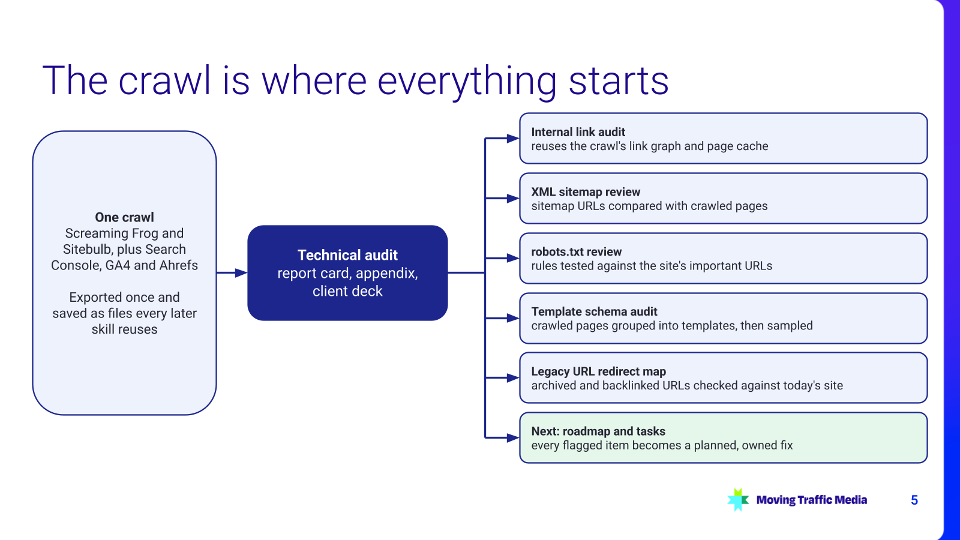
One crawl feeds the technical audit, and the audit’s saved files feed every later deliverable: internal linking, sitemaps, robots.txt, schema, legacy redirects and, next, the roadmap.
Inside the audit, one orchestrator skill runs the phases and hands each section to its own skill. Scripts do the counting, connectors reach the tools, and approval gates stop anything that leaves the workspace.

What you need
| Need | What we use | Swap in |
|---|---|---|
| Agent | Claude Code (desktop app) with your skills packaged as a plugin | Claude Code CLI, or the Claude desktop app with skills |
| Crawl | Screaming Frog SEO Spider (it has an MCP server) and Sitebulb | Any crawler that exports CSV, or Ahrefs Site Audit |
| Search data | Google Search Console, GA4, Ahrefs connector | Semrush or another SEO API |
| Deliverables | Google Sheets, Slides and Drive connectors | Excel and PowerPoint files, or Markdown |
| Hand-off | Slack connector; Asana | Teams, Jira, Linear, email |
| Scripts | Python 3 | Any language Claude can run |
Start here: a prompt to build your own audit skills
Open Claude Code (or Claude with skills turned on) in an empty project folder, paste the prompt below, and fill in the brackets. Claude will interview you, propose a plan for your approval, then build and test one skill at a time. If the skill-creator skill is available, Claude can use it to package each skill.
I run technical SEO audits for [my agency / my company] and want to turn the process into a set of Claude skills I can reuse on every site.
First, interview me one question at a time. Ask about:
– the checklist I use: sections, item IDs and what each check looks at
– where the evidence comes from (my crawler, Search Console, other tools) and the format of each export
– how I grade each item and what a finished deliverable looks like
– which actions must wait for my approval
Then propose a plan before writing anything: one orchestrator skill that runs the audit end to end, one skill per checklist section, shared reference files (checklist, grading rubric, findings format, writing style), and the scripts that will do the counting and parsing. Show me the folder structure and each skill’s name and description, and wait for my approval.
Once I approve, build one section skill end to end. Test it on [a site I’m allowed to crawl], using the crawl export at [path to export], and show me each finding next to its evidence so I can check it. Don’t start the next skill until I’ve reviewed the first.
Rules: never estimate a count in your head; write a script and save its output to a file. Ask before crawling a site, spending money on a paid API, or sending anything to another person.
Step 1: Write the checklist down
Claude can only grade what you’ve defined. Give every check an ID, say where its evidence comes from, and say what passing looks like. Our checklist has about 90 items in 14 sections, graded A to F.
Your turn: your first five checks
| ID | Check | Evidence source | Pass rule |
|---|---|---|---|
| CRI-12 | robots.txt blocks no important pages | Live robots.txt plus crawl | No indexable page in the top 100 by traffic is blocked |
Also write down, once, in a shared reference file:
- How grades work: what earns an A, a C or an F, and how grades roll up into a score
- The findings format: item ID, grade, what we found, why it matters, how to fix it, evidence
- Your writing style: tone, words to avoid, how to describe numbers
- What a finished deliverable looks like: the report, the appendix, the deck
Step 2: Split the work into skills
Don’t write one giant prompt. A skill is a folder with a SKILL.md file: a short description that tells Claude when to use it, then the steps to follow. Skills can carry reference files and scripts with them, and Claude loads them only when the task calls for one.
- One orchestrator skill runs the audit end to end: intake, crawl, each section, deliverables, hand-off
- One skill per checklist section, so each stays short and testable on its own
- Task skills for jobs people ask for alone, such as a robots.txt review or an internal link audit
- Shared references that every skill reads, so sections grade and write the same way
A minimal SKILL.md
---
name: robots-txt-review
description: Reviews a site's robots.txt the way Google reads it. Use when
someone asks to check, fix or explain robots.txt, for example
"is our robots.txt blocking anything".
---
1. Fetch /robots.txt; record the status code, any redirects and the file size.
2. Run scripts/parse_robots.py to list each user-agent group and its rules.
3. Test the site's most important URLs against those rules.
4. Write each finding in the format in references/findings.md.
5. Show the findings and ask before posting them anywhere.
Your turn: map your skills
| Skill | Checklist items it covers | Inputs | Output |
|---|---|---|---|
| Orchestrator | All (runs the phases) | Site, crawl exports, settings file | Report card, appendix, deck, hand-off |
Step 3: Let scripts count and Claude judge
The model should never add up a column in its head. Anything that counts, parses or writes in bulk goes into a script whose output is a file the analyst can open. Claude decides what the numbers mean.
| Scripts do | Claude does |
|---|---|
| Parse crawl exports and fold duplicate URLs | Decide which issues are real and which are noise |
| Build the internal link graph and click depth | Grade each item against the rubric |
| Fetch pages once into a cache | Write findings in your voice, with evidence |
| Batch-write Sheets, Slides or files | Choose which items lead the deck and the post |
Step 4: Set your approval gates
Decide up front which actions need a person to say yes, and write them into the skills. Ours:
| Action | Why it waits for a yes | Your rule |
|---|---|---|
| Starting a crawl | It sends traffic to the client’s site | |
| Paid API searches | They cost money; dry run first and cap per audit | |
| Making files link-shared | Anyone with the link can see them | |
| Posting to Slack or a task tool | The team acts on it right away | |
| Never allowed | Sharing with the client, editing templates, printing API keys |
Step 5: Crawl once, reuse everything
- Export the crawl to files once (CSV or JSON) and point every skill at those files instead of re-crawling
- Fold tracking-parameter URLs (utm_, gclid, fbclid, _gl and similar) into their clean URL before counting anything
- Cache any pages you fetch, so later skills read the cache and the site is hit once
- Keep one working folder per audit with a small settings file (site, dates, channel), so a new session can pick up where the last one stopped
Step 6: Hand off after the audit
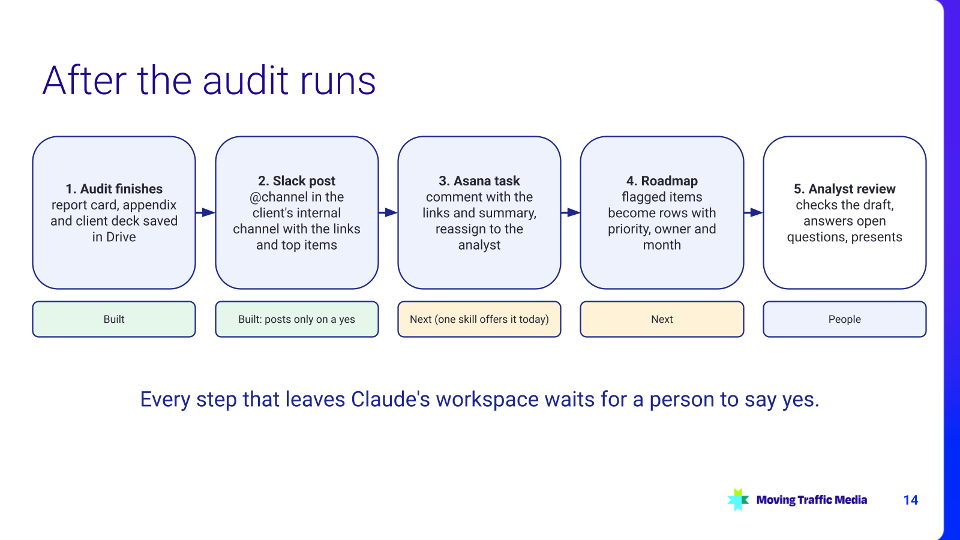
When the audit finishes, the work moves to people. Claude drafts each hand-off and waits for a yes before anything is sent.
Completion post you can adapt
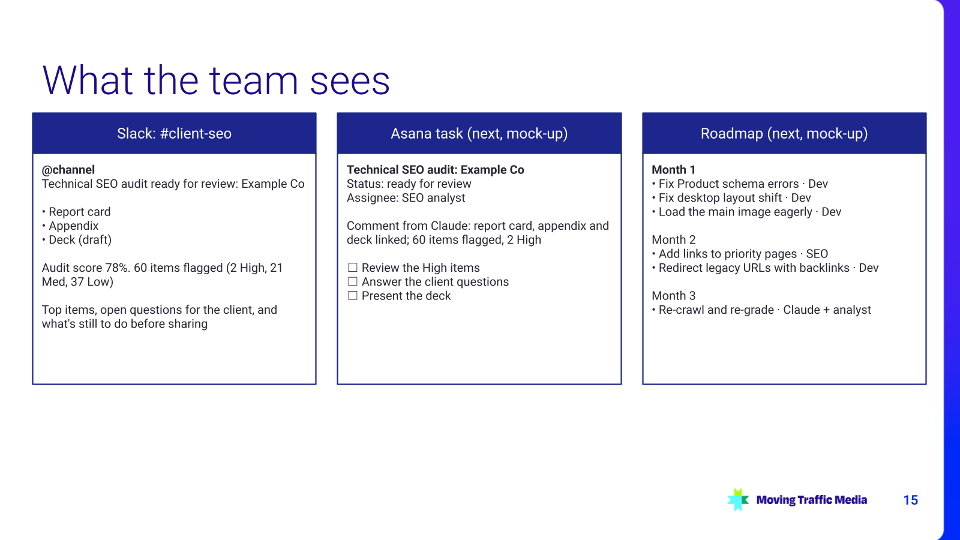
@channel
Technical SEO audit ready for review: {client} ({month})
Report card: {link}
Appendix: {link}
Deck (draft): {link}
Audit score {score}. {n} items flagged ({high} High, {med} Med, {low} Low). Top items:
- {id} {item}: {grade}, {one-line finding}
Open questions for the client: {list}
Still to do before sharing: {list}
Lessons from our first runs
- Check the inputs before trusting a count. A crawler export inflated by about 190,000 tracking-parameter URLs made one link export unusable; fetching the 299 real pages directly and checking the result against the crawl (a 96% match) fixed it.
- Check that results belong to the site. Google can quietly drop a site: operator and return other sites, which made pages look indexed. Count only results on the client’s own domain.
- Duplicates hide in plain sight. “76 internal links” turned out to be 7 pages once tracking-parameter copies were folded together.
- Treat the output as a draft for an analyst, not a finished audit. The time saved goes into review and judgment.
Before you start
- I have a written checklist with IDs, evidence sources and pass rules
- I have a grading rubric and a findings format in one reference file
- I’ve listed which skills I need and what each one produces
- I know which counts will come from scripts
- My approval gates are written into the skills
- I have a test site I’m allowed to crawl
- I know where the finished deliverables and hand-offs go
Prompts to try
- “Review the robots.txt for example.com and show me the findings before writing anything.”
- “Using the crawl export in this folder, list every page with a missing or duplicate title, grouped by template.”
- “Grade the Crawling & Indexing section against references/checklist.md and explain each grade in one line.”
- “Draft the completion post for the team channel, but don’t send it.”
Questions? Find us at movingtrafficmedia.com.